GRANULAR HAND SAMPLER
What Happens When You Touch a Spectrogram With Your Finger
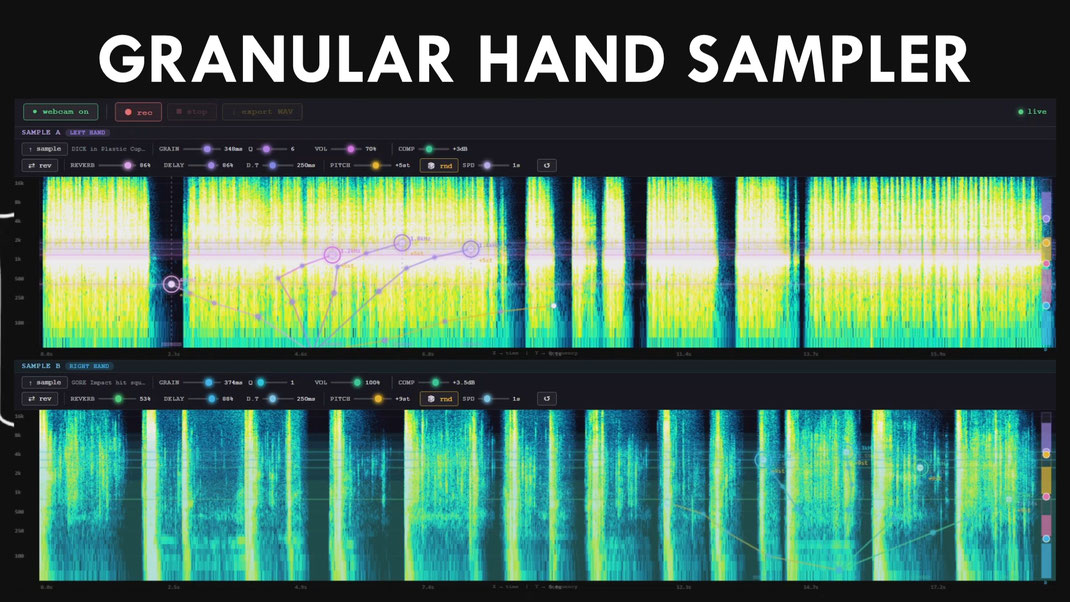
Granular Hand Sampler is a browser-based instrument that turns your hands into a granular synthesizer.
No plugins, no installation — just double click on html file, a webcam, a browser and your audio files.
Load any sample and its full spectrogram appears on screen, with time on the horizontal axis and frequency on the vertical.
Point your fingers at the spectrogram to play:
each open finger triggers an independent grain — a short looping window of the sample, filtered to the frequency band you're touching.
Move left or right to scrub through time, move up or down to shift between frequency zones.
Use both hands simultaneously to control two independent samples, each with its own sound engine.
Pinching your thumb against any finger switches that finger into parameter control mode:
index controls grain size,
middle finger controls pitch,
ring finger controls reverb,
pinky controls delay.
Your hand movements update the parameters in real time, with visual feedback directly on the spectrogram.
Each channel includes grain size, filter Q, volume, reverb, delay, pitch transposition (±24 semitones), reverse playback, and a randomized pitch mode that cycles through pitches automatically at a controllable rate.
Record your performance at any time and export it as a stereo WAV file at 48 000 Hz / 24-bit — ready to import into any DAW without conversion.
Granular Hand Sampler integrates naturally into professional production environments. In Max for Live it can be loaded directly inside a device using the jweb~ object, which embeds a browser window with full
audio routing into the Live signal chain. On any other DAW, a virtual audio cable such as VB-Audio Virtual Cable on Windows or BlackHole on macOS routes the output as a standard audio input,
making it available to any track or plugin.
I recently created a max for live device called HTML INSTRUMENTS that allows you to open this program directly on Ableton.