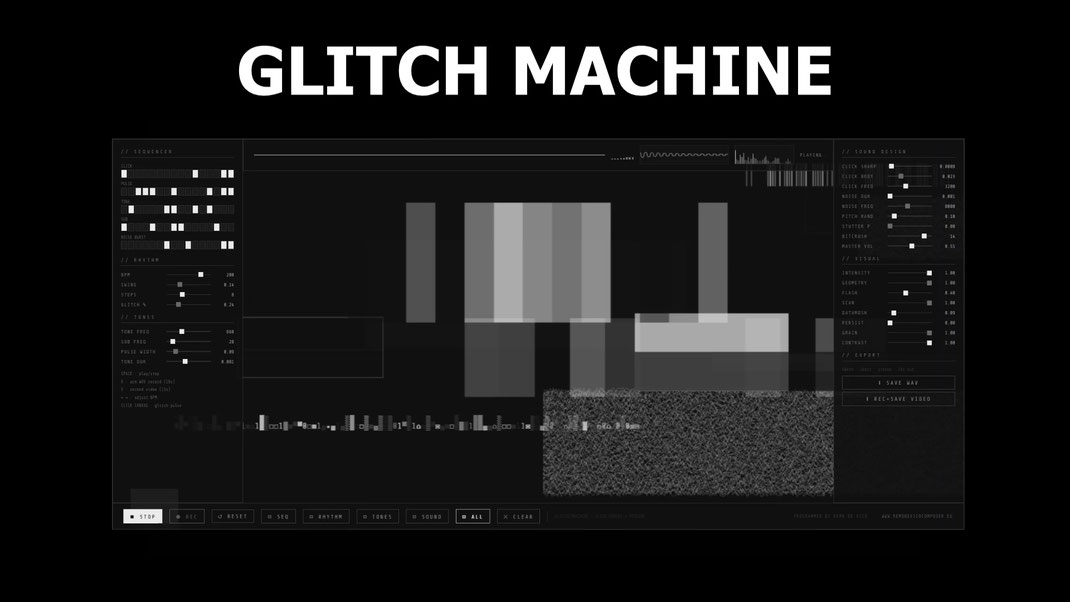
GLITCH MACHINE
A browser-based audiovisual instrument for electronic and experimental music production.
GLITCH MACHINE
is a self-contained instrument that runs directly in your browser — no installation, no plugins, no dependencies. It generates precise electronic sounds and synchronized glitch visuals in real time, drawing from the aesthetics of data corruption and circuit noise.
SOUND ENGINE
At its core, GLITCH MACHINE is a step sequencer with five independent sound sources, each with its own 16-step pattern:
- CLICK — ultra-short transient impulses, bandpass-filtered noise bursts. The fundamental unit of electronic percussion.
- PULSE — square wave with rapid exponential decay. Hard, electrical, precise.
- TONE — pure sine wave test tones with clean attack and release envelopes.
- SUB — deep sine pulses in the bass register. Felt more than heard.
- NOISE BURST — filtered white noise discharges, tunable from 1ms to 40ms. The sound of electricity.
The sequencer runs on a look-ahead scheduler for sample-accurate timing. BPM ranges from 40 to 240, with swing control and variable step count (4, 8, 12, or 16 steps). A probabilistic GLITCH % parameter injects random micro-events between scheduled steps — controlled chaos within a tight rhythmic grid.
All audio is processed at 48kHz through a brick-wall limiter. The sound design section gives full control over transient sharpness, body, frequency, duration, bitcrushing (1–16 bit), and micro-stutter probability.
VISUAL ENGINE
The visual layer runs on a Canvas 2D engine generating pure black and white imagery in real time, synchronized to every sonic event:
- Binary data rain columns
- Geometric flashes — rectangles, lines, circles, triangles, vertical bars
- Horizontal tear lines and scanline displacement
- Datamosh block shifting and pixel sorting
- Dense data matrix strips in the style of Ryoji Ikeda's datamatics
- Film grain, persistence decay, and luminance offset splitting
Every parameter — intensity, geometry density, flash probability, persistence, contrast, scanlines — is fully controllable and responds immediately.
RANDOMIZATION
Four independent randomizers let you explore the entire parameter space instantly:
- ⚄ SEQ — generates new rhythmic patterns with musical density ratios per voice
- ⚄ RHYTHM — picks BPM from a curated list of musical tempos, sets swing and step count
- ⚄ TONES — selects frequencies from musical intervals and octaves, never arbitrary values
- ⚄ SOUND — randomizes transient design, noise filtering, bitcrush, stutter
- ⚄ ALL — fires all four simultaneously for complete preset generation
DAW INTEGRATION
GLITCH MACHINE runs in any browser but its audio output can be routed directly into your DAW for recording, processing, and live performance:
VCable / Virtual Audio Driver Route the browser audio output into your DAW using a virtual audio cable (VB-Audio VCable, Loopback, BlackHole). Set GLITCH MACHINE's audio output to the virtual driver in your OS sound settings, then select the same driver as an input in Ableton Live, Logic, or any other DAW. From there it behaves like any external audio source — record it, run it through effects chains, layer it with other tracks.
Max for Live — jweb~ Load GLITCH MACHINE directly inside Ableton Live using the jweb~ object in Max for Live. Drop a Max for Live device
into a track, open the Max editor, instantiate a jweb~ object and point it to the GLITCH MACHINE
.html file. The browser engine renders inside
the device window and its audio output is available as a Max signal — feed it straight into Live's signal graph, apply Live effects, or use it as a sidechain source. This is the most integrated
workflow: no routing, no latency offset, everything inside one session.
I recently created a max for live device called HTML INSTRUMENTS that allows you to open this program directly on Ableton.
EXPORT
- WAV — 48kHz / 24-bit stereo, up to 16 seconds, true PCM encoding
- VIDEO — HD 60fps WebM with embedded audio, 15 seconds, 10Mbps